Page 20 FTDX1200 Operating Manual

FRONT PANEL CONTROLS & SWITCHES Cont'd

Previous Page    Index of Topics    Table of Contents    Index of Pages    Next Page


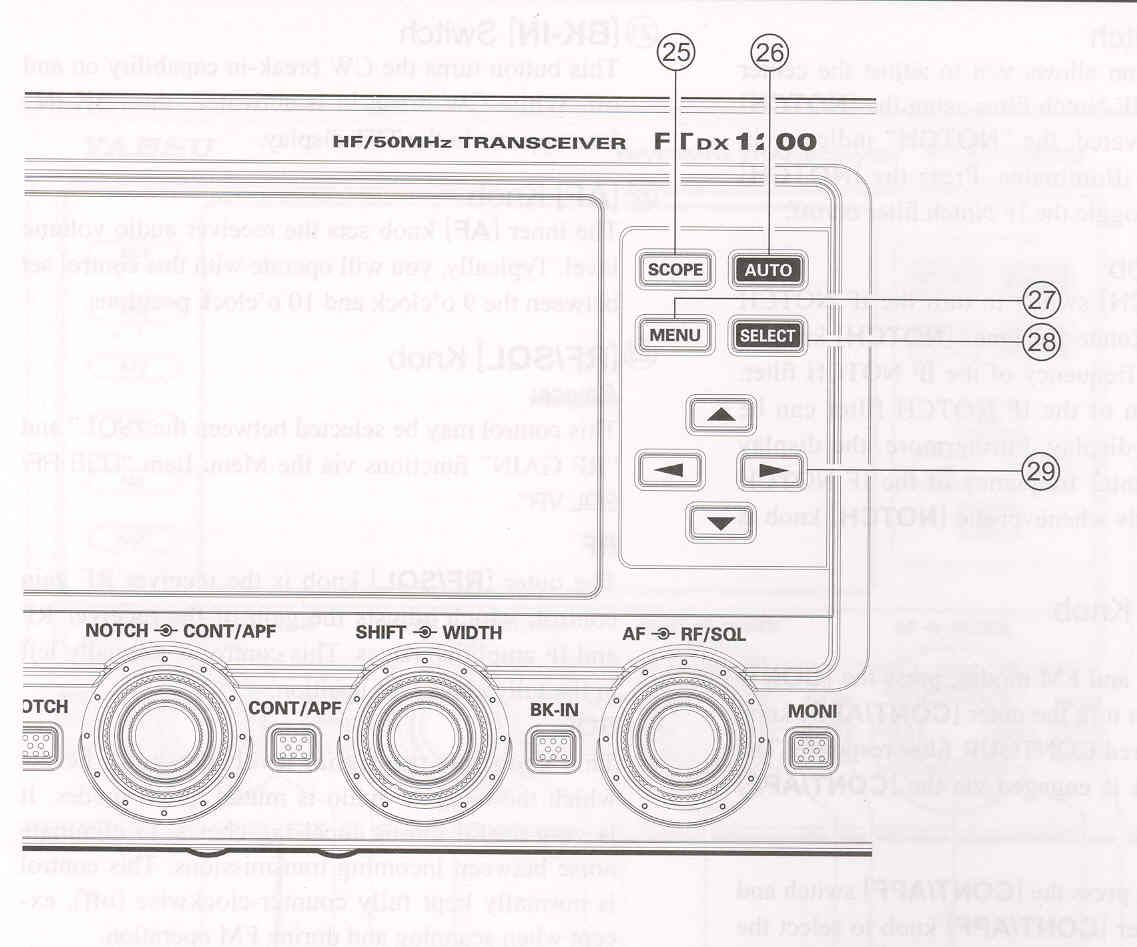
(25) [SCOPE] Switch
Press this button momentarily to switch between the the Menu, the Scope, the Full TFT screen Scope, the Scope + AF-FFT (when the optional FFT unit is installed), and the Scope Memory (when there is memory) screens. When the optional FFT unit is installed, press and hold this button for more than 1 second to operate the decode funtion (when operating CW, RTTY PSK).


(26) [AUTO] Switch
This button is used the select the scope mode (AUTO or MANUAL).


(27) [MENU] Switch
This button is used to access the Menu system. The various transceivr characteristics may be configured. Menu operation is described in detail, in this manuel.

IMPORTANT NOTE:
Pressing the [MENU] button will activate the Menu, and the Menu itams will appear on the display. Once you have changed the parameters, you must press the [MENU] button to save any configuration changes.


(28) [SELECT] Switch
This button is used to select the Menu system.


(29) [◄, ▲, ▼, ►] Switches
These buttons permit selection of the Menu items and settings.


Cont'd Next Page "Front Panel Controls & Switches"

Previous Page    Index of Topics    Table of Contents    Back to Top    Index of Pages    Next Page

Page 20 FTDX1200 Operating Manual